# ScoutFox (/docs)
ScoutFox watches the open web for the things that move your work, sends a
focused **Daily Brief**, and lets you continue the thread in WhatsApp, email,
or the app. Not a database. Not an alert firehose. Not a generic chatbot.
Decision support: *what changed, why it matters to you, what to do next.*
Walk through a new user's first day — sign-up to Daily Brief to follow-up.
## What it's for [#what-its-for]
A venture fund is racing competitors to a deal. A newsroom is racing
competitors to a story. In both cases,
**timing is the edge** — and the existing tools (Crunchbase, Google Alerts,
RSS, "AI assistants") surface things after the moment has passed.
ScoutFox is built to be early. You describe what you care about; scouts
continuously hunt, score against *your* priorities, and send the small number
of signals worth your attention.
## How it's different [#how-its-different]
* **Personalized at the core.** Every dispatch is scored against *your* brief —
your thesis, your beats, your goals — not a generic ranking.
* **Decision-support, not noise.** Each dispatch is one thing: a hook, why it
matters to you, primary sources, and the next step.
* **Primary sources favored.** Filings, the source itself, founder posts —
over aggregator rehashes.
* **Conversation-native.** WhatsApp replies, email replies, and app threads
update the same watch memory instead of becoming disconnected chats.
* **Minimal dashboard.** Your **Interests list** is the configuration home.
The Wire remains available for live dispatches, but the product value should
come to you through Daily Briefs and follow-up threads.
## Start here [#start-here]
Sign in, capture your brief, watch the first dispatches arrive.
The loop: brief → interests → scouts → Daily Brief → reply → memory.
The secondary live feed for dispatches.
## Shape your brief [#shape-your-brief]
ScoutFox is one product. Your brief's vertical setting shapes *what scouts
look for* and *what shape the dispatch takes* — not a separate dashboard.
Deal-shaped dispatches. Early-stage leads matched to your fund's thesis.
Scoop-shaped dispatches. Primary-source verified, rival-outlet aware.
# Briefs (/docs/concepts/briefs)
A **brief** is the root of everything ScoutFox does for you. It's the one
place you describe:
* **Name** — a label for the brief. Today every user has one brief; multi-brief
is on the roadmap.
* **What you care about** — your focus areas, in your own words.
* **Why it matters** — your context (the thesis, the angle, the goal).
* **Who you race** — competitors whose moves you care about.
* **How to reach you** — delivery channels, frequency, do-not-disturb.
Every interest, every run, every delivery decision reads from the brief.
## Why one brief [#why-one-brief]
Older systems make you configure every alert separately. That works for two
alerts and falls apart at twenty. The brief flips it: configure the *person*
(or fund / desk / brand) once; every interest inherits the context.
It also means **edits propagate.** Refine your thesis paragraph in one place
and the next run scores every finding against the new text. No per-alert
rebuild.
## What's in a brief [#whats-in-a-brief]
| Field | What it does |
| ---------------------------------------- | -------------------------------------------------------------------------- |
| **Name** | The label for this brief. |
| **Focus areas / sectors / beats** | Free-form list. Each becomes an [interest](/docs/concepts/interests). |
| **Tags** *(optional)* | Free-form labels on interests. See [Tags](/docs/concepts/tags). |
| **Context paragraph** | Your thesis / angle / positioning. Every dispatch scored against it. |
| **Competitors / rivals** | Funds, outlets, brands you don't want to lose to. Flagged on dispatches. |
| **Delivery preferences** | Channels, frequency, quiet hours. See [Delivery](/docs/concepts/delivery). |
| **Voice profile** *(optional)* | Vocabulary, jargon to avoid, audience. Used by the synthesis layer. |
The context paragraph is the highest-leverage edit you can make. A vague
brief produces a vague Wire. A sharp, specific one — *"India seed-stage
robotics, hardware-strong technical founders, avoid pure-software plays"* —
produces a sharp Daily Brief.
## Editing the brief [#editing-the-brief]
All brief edits happen either in **Profile → Brief** or via
[cmd+k slash commands](/docs/concepts/slash-commands) — `/profile`,
`/pause anduril hiring`, `/new`, `/tag defense`. The dashboard's Interests
list is the simple configuration surface for reviewing and editing what Scout
watches.
## When a brief mutates itself [#when-a-brief-mutates-itself]
If you opt in to **auto-pilot**, your brief's interests can refine themselves
between runs — merging redundant interests, tightening exclusions, retuning
freshness windows. Every change is journaled with a 7-day rollback. Off by
default.
# Cmd+K (/docs/concepts/cmd-k)
**Cmd+K** is the global command palette. Press `⌘+K` (or `Ctrl+K`) from any
dashboard page and it opens; it's also pinned as a persistent bar at the
bottom of the [Wire](/docs/concepts/wire).
Cmd+K is how you steer ScoutFox without ever leaving the keyboard.
## Two paths [#two-paths]
Cmd+K routes your input down one of two paths based on whether it starts with
a `/`:
### 1. Slash commands — deterministic, instant [#1-slash-commands--deterministic-instant]
Start with `/` and you get a structured command. No LLM call. Examples:
* `/profile` — open profile settings.
* `/billing` — open billing.
* `/pause anduril hiring` — pause the interest matching that name.
* `/new` — create a new interest.
* `/edit` — open the active interest's edit page.
* `/tag defense india` — add tags to the active interest.
* `/filter time-sensitive` — apply a Wire filter.
Slash commands are the navigation + mutation verbs of the product. See the
[full directory](/docs/concepts/slash-commands).
### 2. Free text — routes to a fresh Notebook [#2-free-text--routes-to-a-fresh-notebook]
Type anything that doesn't start with `/` and cmd+k opens a new
[Notebook](/docs/concepts/notebook) with your input as turn one. The answer
streams in token-by-token over SSE. Optimistic — the Notebook opens before
the first token, so the surface never feels like it's waiting.
Examples:
* *"What's the latest on Anduril's hiring?"*
* *"Compare this dispatch to last quarter's defense signals."*
* *"Tag this finding under climate and add it to my watch list."*
## Why two paths [#why-two-paths]
Mutations need to be exact, fast, and reversible. *"Pause Anduril hiring"*
should never be misread by an LLM as a question about Anduril's hiring;
`/pause anduril hiring` is unambiguous and applies instantly.
Open-ended questions, on the other hand, *want* a model — so free text drops
into a Notebook where the scout can stream a real answer with citations.
## Cmd+K is global [#cmdk-is-global]
It works the same on every dashboard surface:
* On the Interests list — opens over the home page.
* On the Wire — opens over the feed.
* Inside a Notebook — opens over the thread; useful for *"pause this
interest"* mid-conversation.
* Anywhere else in `/dashboard/*`.
The persistent bar at the bottom of the Wire is the same component, just
docked.
## What cmd+k replaces [#what-cmdk-replaces]
Cmd+K is intentionally the *only* way to do most of these things. There is no
standalone templates page or settings tree. If you can't remember where
something lives, press cmd+k and type.
# Delivery (/docs/concepts/delivery)
ScoutFox should come to you. The primary delivery artifact is the
**Daily Brief**: a small set of source-linked signals worth your attention,
with reply verbs that update the same watch memory across channels.
## Channels [#channels]
| Channel | Format | Best for |
| ----------------- | --------------------------------- | --------------------------------------------------------------------------- |
| **Daily Brief** | Three things worth your attention | The default output. Read, reply, or open a thread. |
| **WhatsApp** | Daily Brief + short replies | Users and teams who live in WhatsApp. Long replies hand off to app threads. |
| **Email** | Daily Brief + threadable replies | Forwardable briefs and deeper async follow-up. |
| **App threads** | Stateful Scout memory rooms | Deeper explanations, corrections, saved signals, and follow-up work. |
| **Wire (in-app)** | Live dispatches | Secondary feed for scanning recent dispatches. |
| **PDF brief** | On demand, styled | Share a dispatch or daily edition with partners / editors. |
All push channels use the same **clean format**: hook + sources + deep link.
Never raw dumps.
## Daily Brief first [#daily-brief-first]
External channels are **brief-first**. One focused Daily Brief, at a time you
choose, should beat five channels full of partial alerts.
This is intentional. Until the quality bar is met across the board, ScoutFox
won't wake you on the wrong channel. The Wire is where you go when *you* want
to scan; the Daily Brief is where Scout comes to *you*.
## Daily digest [#daily-digest]
Once per day, at your chosen time, you get one message:
```
Three things worth your attention today.
1. What changed
2. Why it matters
3. What to do next
```
Click through to open the relevant app thread or dispatch. Reply with
`explain`, `save`, `ignore`, `send`, `dig deeper`, or a natural-language
correction.
The brief is curated, not just bucketed. Dispatches are deduplicated, sorted
by quality, and capped. A 30-dispatch day should still produce a focused
brief, not a wall.
## Replies update memory [#replies-update-memory]
Replies are not treated as generic chat. Each meaningful reply resolves to:
user, channel, thread, anchor object, intent, state delta, and next step.
* `save` persists positive feedback.
* `ignore` persists negative feedback.
* `explain` returns the why-now.
* `dig deeper` continues in an app thread or email.
* corrections update the watch brief or interest scope.
WhatsApp stays readable: long answers are written into the app thread and the
WhatsApp message gets a short handoff link.
## PDF on demand [#pdf-on-demand]
Every dispatch has a **Brief me · PDF** action. Click it; the rendered brief
opens in a new tab. Same content as the in-app dispatch, formatted for sharing
with an investment partner, an editor, or a brand team.
A full daily edition can also be rendered as a PDF when you want one document
to share around.
## Editing delivery [#editing-delivery]
All channel preferences live in **Profile → Brief → Delivery**, reachable
from the dashboard or with `/profile` in cmd+k. Quiet hours, weekly-only
mode, channel-specific toggles — all per-brief, applied on the next run.
# Dispatches (/docs/concepts/dispatches)
A **dispatch** is the atomic unit of ScoutFox. One dispatch = one significant
thing the scouts filed: a funding round forming, a story lead nobody else has,
a regulatory filing that moves a thesis, a system note that a scout retired.
Every dispatch lands on the [Wire](/docs/concepts/wire).
## Dispatch types [#dispatch-types]
There are four types, distinguished by a pill on the card.
| Type | What it is |
| ------------- | -------------------------------------------------------------------------------------------------- |
| **event** | Something happened in the world — a deal, a filing, a hire, a launch. Time-stamped to the source. |
| **finding** | A scout-synthesised observation across multiple sources. Most VC and news dispatches are findings. |
| **system** | A note from the engine itself — *"scout for ‘OpenAI restructuring' archived: story cooled"*. |
| **assistant** | A reply from a scout in a Notebook conversation that warranted a Wire-level surface. |
## Card anatomy [#card-anatomy]
Top to bottom:
| Field | What it is |
| --------------------------- | -------------------------------------------------------------------------------------------------------------------- |
| **Kicker** | The interest (and any tags it carries) the dispatch came from. |
| **Type pill** | event / finding / system / assistant. |
| **Domain tag** | Topical tag — *defense*, *climate*, *markets*, etc. |
| **Time-sensitive flag** | Lights up when the window to act is closing. |
| **Headline** | One line. Load-bearing terms are highlighted inline in orange. |
| **Why this matters** | Italic-serif pull-quote — the editorial line in the voice of your brief. |
| **Sources** | One row per source: favicon · domain · tier pill (PRIMARY / SECONDARY / AGGREGATOR) · relative time · external link. |
| **Confidence bar** | Visual 0–100 of how corroborated the dispatch is. |
| **Novelty + class-pattern** | *new-arc / continuation*, paired with the engine's pattern label (e.g. *hiring-shift*, *traction-inflection*). |
| **Actions** | *Brief me · PDF*, *Ask scout*, *Copy link*, *more / less like this*. |
## The actions, in detail [#the-actions-in-detail]
* **Brief me · PDF** — renders the full brief for this dispatch and opens it
in a new tab. Shareable with partners / editors.
* **Ask scout** — opens a [Notebook](/docs/concepts/notebook) anchored to
this dispatch, with the scout primed to answer follow-ups about it.
* **Copy link** — copies `/dashboard?d=` to the clipboard. Recipient lands
on the Wire with the dispatch expanded.
* **more / less like this** — taste feedback. Feeds the per-user LinUCB
scoring loop; the next run weighs accordingly.
## Where dispatches come from [#where-dispatches-come-from]
Each dispatch is the output of a Run on an Interest. Internally:
* **Vertical = general** → `IntelligenceReport.findings` → dispatch.
* **Vertical = vc** → `Run.deal_cards` → dispatch (deal-shaped).
* **Vertical = news** → `Run.scoop_cards` → dispatch (scoop-shaped).
The Wire renders all three uniformly. The vertical only shapes what the scout
*looks for* and what shape the underlying card takes; it does not change the
surface you use.
## Vertical-shaped dispatches [#vertical-shaped-dispatches]
When your [brief](/docs/concepts/briefs) is set to a vertical, dispatches take
a vertical-specific shape. Same Wire, same card chrome — just extra fields
tuned to how that audience reads.
### Deal-shaped dispatches [#deal-shaped-dispatches]
The shape a dispatch takes when your brief's vertical is `vc`. Each one is a
single early-stage company, surfaced because it fits your thesis and is still
actionable.
| Field | What it tells you |
| --------------------- | ------------------------------------------------------------------------------------------------------------------------------------------------ |
| **Hook** | One line — the lead, and why it's investable now. |
| **Company** | Name, website, stage (pre-seed → growth). |
| **Founders** | Each founder, with public pedigree — where they came from, what they built. |
| **Round** | Amount, lead investor, date — or *no round yet*, which is often the point. |
| **Why this matters** | The stakes and the window — why this is the moment to move. |
| **Thesis match** | A 0–100 score and a plain-language rationale, scored against *your* thesis. See [Thesis match](/docs/concepts/interests#thesis-match-vc-briefs). |
| **Portfolio overlap** | Flags a company you already hold, when that data is on your brief. |
| **Circling** | Which of the competitor funds you track are publicly linked to the deal. |
| **Sources** | Every claim cited; primary sources favored. |
| **Confidence bar** | How corroborated the signal is. |
A deal-shaped dispatch is a *lead*, not a funding announcement: pre-round or
round-open, with a concrete why-now. If a round is closed with a lead locked,
that's news — deprioritized or dropped. The schema is strict: no AI-synthesized
"investment recommendation," and funding figures must trace to a real source.
### Scoop-shaped dispatches [#scoop-shaped-dispatches]
The shape a dispatch takes when your brief's vertical is `news`. Each one is
one development on a beat you cover, with the primary source, the editorial
angle, and the state of competitor coverage.
| Field | What it tells you |
| ------------------------------------ | ------------------------------------------------------------ |
| **Hook** | One line — the story, in editorial voice. |
| **What happened** | The development, traced to a primary source. |
| **Why this matters (for your desk)** | The angle, scored against your brief. |
| **Primary source** | The filing, the post, the press release — not an aggregator. |
| **Competitor coverage** | Which tracked outlets have covered it; which haven't. |
| **Confidence bar** | How corroborated. |
| **Suggested angle** | An editorial framing tuned to your brief (optional). |
When the scoop-gated instant push is active, it fires only when **all** of
these hold: confidence tier *high*, primary source verified, at least two
tracked rival outlets do not have the story, and no fetch failures (a fetch
flake never counts as "uncovered"). Everything else lands on the Wire or in
the digest.
## What never makes it to a dispatch [#what-never-makes-it-to-a-dispatch]
* Unsourced claims — every line cites.
* Aggregator-only stories with no traceable primary.
* Speculative figures that fail verification.
* Anything below the per-interest rubric bar.
# How it works (/docs/concepts/how-it-works)
ScoutFox runs one loop, continuously, per user. Every surface in the product
is a view onto the same pipeline.
## The loop [#the-loop]
1. **Brief** — your one source of truth: what you care about, the context that
defines fit, who you race, how you want to be reached.
See [Briefs](/docs/concepts/briefs).
2. **Interests** — each focus area is an *interest*: a standing (or event)
scout for one slice. See [Interests](/docs/concepts/interests).
3. **Tags** — optional free-form labels on interests; the home page can group
or filter by them. See [Tags](/docs/concepts/tags).
4. **Scouts** — every interest carries typed [signals](/docs/concepts/signals)
the scout knows how to hunt: funding rounds forming, founder moves, story
leads, regulatory filings.
5. **Runs** — on a schedule, the scout executes: gathers candidates, verifies
them against primary sources, and scores them against your brief.
6. **Dispatches** — verified findings are filed as
[dispatches](/docs/concepts/dispatches), the source-linked unit of value.
7. **Daily Brief** — Scout packages the best few dispatches into a brief:
what changed, why it matters, sources, and one next action.
8. **Replies** — WhatsApp, email, and app-thread replies map to shared
conversation state: explain, save, ignore, send, correct, deepen, pause,
resume, or sources.
9. **Memory** — replies update the watch memory so the next brief is sharper.
## The surfaces [#the-surfaces]
ScoutFox has a small surface area on purpose.
| Surface | What it's for | |
| ------------------------------------------------------ | ------------------------------------------------------------------------------------------------------------------- | ------------------------------------------- |
| **Interests list** (`/dashboard`) | The home. Flat list of your interests; \`List | By tag\` view toggle; filter chips per tag. |
| **Daily Brief** (`/today`, email, WhatsApp) | The primary consumption loop: three things worth your attention and reply verbs. | |
| **WhatsApp / Email** | Channel-native brief delivery and replies. Long WhatsApp replies hand off to app threads. | |
| **Threads** (`/dashboard/threads`) | Scout memory rooms for follow-ups anchored to an interest, dispatch, source, brief, or delivery. | |
| **Wire** (`/dashboard/wire`) | Secondary live dispatch feed — every dispatch across every interest, chronologically. | |
| **Interest editor** (`/dashboard/interests/[id]/edit`) | Tabbed form: Basics / Signals / Investigation / Strategy. | |
| **Cmd+K** | Global palette on every dashboard page. Slash commands for nav and mutations; free text routes to a fresh Notebook. | |
You land on the **Interests list** post-sign-in, not the Wire. The home is
your standing setup; Scout comes to you through the Daily Brief and channel
replies.
## What the engine favors [#what-the-engine-favors]
The same principles apply across verticals:
* **Primary sources** — filings, the source itself, founder/operator posts.
Aggregators are deprioritized.
* **Early signals** — the things that *precede* the obvious event. A round
forming, not a round closed. A founder leaving, not their next company
announced. A regulatory filing, not the press release on it.
* **Personalized scoring** — every dispatch is scored against the *full text*
of your brief, not a generic "good story" rank.
* **Honest confidence** — every dispatch carries a confidence bar and cites
every claim. Speculative figures are dropped before they reach you.
## What it deliberately skips [#what-it-deliberately-skips]
* *"Company X raised $Y, led by Z"* — that's news, not a lead. The round is
taken.
* *"Three trends in AI this week"* — that's commentary, not signal.
* Anything ScoutFox can't trace to a primary source.
ScoutFox is opinionated about quality over volume. A quiet day with three
sharp brief items is the goal. A loud day with thirty mediocre ones is a
failure mode we actively design against.
# Interests (/docs/concepts/interests)
An **interest** is one focus area you've told ScoutFox to watch. *India
robotics*. *Climate-tech VC*. *Markets desk — India regulatory*. Each one
runs on its own schedule and files its own dispatches to the
[Wire](/docs/concepts/wire).
Your interests live on the home page at `/dashboard` as a flat list. Open the
*By tag* view to group them; click a tag chip to filter. Add, edit, pause and
archive them either inline on that page or via
[cmd+k slash commands](/docs/concepts/slash-commands).
## What's in an interest [#whats-in-an-interest]
| Field | What it does |
| ----------------- | ----------------------------------------------------------------------------- |
| **Name** | How it shows up in filters and dispatches (free-form). |
| **Query** | The free-text question the scout is hunting against. |
| **Tags** | Free-form labels for grouping and filtering. See [Tags](/docs/concepts/tags). |
| **Lifecycle** | *standing* (always on) or *event* (auto-archives when cooled). |
| **Status** | *running*, *idle*, *paused*, or *archived*. |
| **Frequency** | How often it runs (hourly, daily, weekly, on-demand). |
| **Strategy mode** | The investigation posture — e.g. *primary-only*, *broad*. |
| **Risk tone** | How aggressive the engine should be on borderline findings. |
| **Channels** | Which delivery channels this interest's dispatches flow to. |
| **Signals** | Typed things to hunt — see [Signals](/docs/concepts/signals). |
| **Source priors** | Domains/outlets to favor or exclude. |
| **Rubric config** | Per-interest quality bar (min sources, primary-only, etc.). |
Most of these inherit sensible defaults from your [brief](/docs/concepts/briefs)
on creation. Override per-interest when you want.
## The edit surface [#the-edit-surface]
`/dashboard/interests/[id]/edit` opens the interest in a tabbed form:
* **Basics** — name, query, tags, lifecycle, frequency, channels.
* **Signals** — inline CRUD for the typed things the scout hunts (event vs
metric signals; metric signals carry a baseline + deviation threshold).
* **Investigation** — the InvestigationPlan: thesis, exclusion rules, primary
domains, persona. Saving replaces the plan in full.
* **Strategy** — strategy mode, risk tone, rubric overrides.
Each tab owns its own Save button — you can't accidentally publish a stale
draft from a sibling tab. `/dashboard/interests/new` uses the same form
structure for create.
## Status states [#status-states]
* **running** — actively scheduled, currently mid-run.
* **idle** — scheduled, waiting for its next slot.
* **paused** — you (or a slash command) stopped the schedule. Resume any time.
* **archived** — retired. Event-lifecycle interests land here automatically
when the story cools.
## Standing vs event [#standing-vs-event]
* **Standing** — *"India robotics dealflow"* runs forever. The interest tracks
a domain you'll always care about.
* **Event** — *"Track the OpenAI restructuring story"* runs until the story
cools, then auto-archives. Useful for finite arcs.
## Where interests come from [#where-interests-come-from]
Two ways:
1. **From your brief.** Each focus area you name becomes an interest
automatically.
2. **Scouts.** A *scout* is a parameterized interest template — e.g. the
`vc_dealflow` scout takes a `thesis` parameter and stamps out a tuned
interest per sector. The output lands on your Interests list like any
other.
## Run history [#run-history]
Each interest carries its full run history. Click into an interest from the
home list to see its dispatches; ask a question in a
[Notebook](/docs/concepts/notebook) anchored to the interest to dig into a
particular run.
## Thesis match (VC briefs) [#thesis-match-vc-briefs]
When your brief's vertical is `vc`, every dispatch carries a **thesis-match
score** — 0 to 100 — and a short, plain-language rationale.
The score is not a generic "good startup" rank. It is computed by reading the
deal against **your fund's investment thesis** — the paragraph you wrote at
setup. Sector fit, stage fit, founder profile, the specifics of what you back
and what you avoid all feed it.
Two funds see the same company. ScoutFox scores it differently for each —
because it scores against each fund's *actual* thesis, not a shared ranking.
A number alone isn't decision support. Each card explains the score in a
sentence or two — *"Bullseye — India robotics, world-class hardware founder,
pre-everything"* or *"Adjacent — strong founder, but consumer sits outside a
pure infra thesis; opportunistic."* The rationale is honest about weak fit
too; a 0.78 will tell you what's off, not paper over it.
Your thesis is editable under **Profile → Deal sourcing**. A sharp, specific
thesis produces a sharp feed. The feed re-ranks on the next run.
## Beats (news briefs) [#beats-news-briefs]
When your brief's vertical is `news`, an interest is called a **beat**. *India
markets — regulatory angle.* *Climate policy — APAC.* *Enterprise AI
infrastructure.* The wording is yours; ScoutFox does not impose a fixed
taxonomy — *"India markets — regulatory"* and *"India markets — IPO pipeline"*
are different beats, and free-form text is the only way to tell them apart.
Each beat is just an interest under the hood: same schedule, same dispatches,
same edit surface. The engine reads the beat's intent from your brief's
context paragraph and tunes the signal hunt — story-lead candidates,
regulatory/filing watchers, rival-outlet coverage checks. Start narrow
(2–3 sharp beats produce a sharper feed than 10 vague ones) and add more
once you see what surfaces.
# Scout Threads (/docs/concepts/notebook)
A **Scout thread** is where a brief item becomes a working conversation. It
lives at `/dashboard/threads/[id]`, one per chat thread, and should be
anchored to something concrete — a [dispatch](/docs/concepts/dispatches), an
[interest](/docs/concepts/interests), a Daily Brief delivery, a source, or the
[brief](/docs/concepts/briefs) itself.
Daily Brief and WhatsApp are for fast reading. Threads are for depth and
memory.
## How you get into a Notebook [#how-you-get-into-a-notebook]
* **Daily Brief item** — opens a thread anchored to that brief item or its
interest.
* **WhatsApp handoff** — long answers are written into a thread, with a short
link sent back to WhatsApp.
* **Ask scout** on any dispatch — opens a thread anchored to that dispatch.
* **Free-text cmd+k** — typing a question into cmd+k (instead of a slash
command) opens a fresh thread with that question as turn one.
* **Direct navigation** — clicking an existing thread in your history.
## What's in a Notebook [#whats-in-a-notebook]
* **A streaming conversation** — scout replies arrive token-by-token over SSE.
No "thinking…" wait wall.
* **A bottom composer** for follow-ups.
* **A memory rail** showing the *anchor*, room type, next reply verbs, and
cited dispatches:
* **ANCHOR** — what this thread is about. The dispatch, interest, Daily
Brief, source, or brief that scoped the conversation.
* **CITED DISPATCHES** — every dispatch the scout has referenced inline,
listed for quick jumping back to the Wire.
* **Inline tool-call action chips** — when the scout takes an action
mid-conversation (e.g. *paused interest "anduril hiring"*), a small chip
appears in the transcript instead of plain text. Click through to undo or
inspect.
## What the scout can do in a thread [#what-the-scout-can-do-in-a-thread]
Beyond just answering, the scout can take actions on your behalf — tool calls
that mutate state. Examples:
* Pausing or resuming an interest.
* Creating a new interest or tagging an existing one.
* Pulling fresh signals on a sub-topic.
* Generating a one-off PDF brief.
Every mutation surfaces as an inline tool-call chip; nothing happens silently.
## Anchors, in detail [#anchors-in-detail]
The anchor shapes the scout's context window:
| Anchor | What the scout sees |
| -------------------------- | ------------------------------------------------------------- |
| **Dispatch** | The full dispatch, its sources, and the run that produced it. |
| **Interest** | The interest's signals, recent runs, and recent dispatches. |
| **Daily Brief / Delivery** | The brief item, delivery context, and user's reply intent. |
| **Source** | The source and related dispatches or signals. |
| **Brief** | The whole brief and the recent Wire. |
A free-text cmd+k question that doesn't reference anything specific opens with
the *brief* as its implicit anchor.
## Threads vs Daily Brief vs Wire [#threads-vs-daily-brief-vs-wire]
| Surface | Use it when… |
| -------------------- | ---------------------------------------------------- |
| **Daily Brief** | You want the few things worth attention today. |
| **WhatsApp / email** | You want to reply in the channel where you work. |
| **Scout thread** | You want to follow up, correct, save, or dig deeper. |
| **Wire** | You want to scan the live feed of dispatches. |
# Signals (/docs/concepts/signals)
A **signal** is a typed thing a scout knows how to hunt. Signals are a
*property of an interest* — they're not a surface you browse. You don't see a
"signals page"; the [Wire](/docs/concepts/wire) shows you what the signals
produce.
Signals are how the engine stays specific. *"Anything interesting about
robotics"* is a search query; *"funding rounds forming in robotics"* +
*"founder & team moves in robotics"* + *"traction inflections in robotics"*
is a hunt plan.
## Anatomy of a signal [#anatomy-of-a-signal]
| Field | What it does |
| -------------------- | ------------------------------------------------------------------------ |
| **Type** | What kind of thing — *funding round*, *founder move*, *story lead*, etc. |
| **Source strategy** | Where to look — primary sites, social, filings, multi-source. |
| **Trigger criteria** | What makes a candidate worth surfacing (thresholds, must-haves). |
| **Action context** | What the user is going to *do* with this — frames synthesis. |
| **Source priors** | Domains to favor, domains to exclude. |
## Signal types we ship [#signal-types-we-ship]
The catalogue grows; today the engine has battle-tested signals for:
* **Funding rounds & term sheets** — rounds forming, SEC Form D, "in talks to
raise", lead investor names.
* **Founder & team moves** — leaders going independent, key hires, departures.
* **Traction & momentum** — adoption metrics, customer wins, hiring surges.
* **Story leads** — primary-source developments worth a news desk's attention.
* **Regulatory / filings** — court records, agency releases, public filings.
A VC vertical interest typically carries 3-4 signals (funding + founder
moves + traction). A news vertical interest carries story-lead + regulatory.
## Why typing matters [#why-typing-matters]
Untyped search ("find me robotics things") drowns in noise. Typed signals let
the engine pick the right *source* for each thing — Form D for funding,
LinkedIn for founder moves, the company's own site for product launches — and
verify each finding against the right primary source.
You don't typically configure signals by hand. The scout templates that build
your interests carry tuned signals appropriate to the vertical. Power users
can override per-interest.
# Slash commands (/docs/concepts/slash-commands)
Slash commands are the deterministic, instant path in
[cmd+k](/docs/concepts/cmd-k). They never call an LLM — they navigate, filter,
or mutate, and they apply right away.
Type `/` in cmd+k and you'll see autocomplete; this page is the full
reference.
## Navigation [#navigation]
| Command | What it does |
| ------------ | ------------------------------------------------- |
| `/profile` | Open profile settings. |
| `/billing` | Open billing. |
| `/brief` | Jump to brief settings (name, context, delivery). |
| `/wire` | Jump to the Wire (clears active filters). |
| `/notebooks` | List recent Notebook threads. |
## Filtering the Wire [#filtering-the-wire]
| Command | Args | Example |
| ------------------------ | ------------------------------------ | --------------------------------- |
| `/filter interest:` | interest name | `/filter interest:anduril-hiring` |
| `/filter tag:` | tag name | `/filter tag:defense` |
| `/filter type:` | event / finding / system / assistant | `/filter type:event` |
| `/filter time-sensitive` | — | `/filter time-sensitive` |
| `/filter clear` | — | Drop all active filters. |
Filters stack; run them in sequence to narrow further.
## Interest verbs [#interest-verbs]
| Command | Args | What it does |
| ---------- | ------------------------------- | ----------------------------------------------------------------------- |
| `/new` | description *(optional)* | Open the new-interest form. With a description, pre-fills name + query. |
| `/edit` | interest name *(optional)* | Open the edit page for the active or named interest. |
| `/pause` | interest name | Pauses the interest (no scheduled runs). |
| `/resume` | interest name | Resumes a paused interest. |
| `/archive` | interest name | Archives the interest. Run history retained. |
| `/rename` | ` → ` | Renames an interest. |
Example:
```
/new early-stage indian drones
/edit anduril hiring
/pause anduril hiring
/rename anduril hiring → anduril team moves
/archive anduril team moves
```
## Tag verbs [#tag-verbs]
| Command | Args | What it does |
| ------------- | --------- | ----------------------------------------------------- |
| `/tag` | tag names | Add one or more tags to the active or named interest. |
| `/tag remove` | tag name | Drop a tag from the active or named interest. |
Example:
```
/tag defense india
/tag remove india
```
See [Tags](/docs/concepts/tags) for how they're used on the home page.
## Delivery [#delivery]
| Command | Args | What it does |
| ------------- | -------------------------- | -------------------------------------------------------------- |
| `/digest now` | — | Render the current digest immediately to your default channel. |
| `/quiet on` | duration *(optional)* | Snooze external pushes (default 24h). |
| `/quiet off` | — | Re-enable pushes. |
## Dispatch actions (when one is in focus) [#dispatch-actions-when-one-is-in-focus]
| Command | What it does |
| ------------------------------------- | -------------------------------------------------- |
| `/brief-me` | Render the focused dispatch as a PDF in a new tab. |
| `/ask` | Open a Notebook anchored to the focused dispatch. |
| `/copy-link` | Copy the deep-link to clipboard. |
| `/more-like-this` / `/less-like-this` | Taste feedback. |
## Notes [#notes]
* Slash commands are case-insensitive and tolerate partial matches on names
(`/pause anduril` is enough if there's only one *anduril* interest).
* Every mutation is reversible from the brief's audit log; auto-pilot
mutations have a 7-day rollback window (see
[Briefs](/docs/concepts/briefs)).
* If a command is ambiguous (e.g. two interests match), cmd+k disambiguates
inline before running it.
# Tags (/docs/concepts/tags)
A **tag** is a free-form label attached to an [interest](/docs/concepts/interests).
*defense*. *india*. *q4-themes*. Tags are how you slice a busy brief without
splitting it into multiple briefs.
Tags are stored on the interest itself (`Interest.tags: List[str]`). An interest
can carry any number of them, and the same tag can be shared across as many
interests as you like.
## Where tags surface [#where-tags-surface]
* **Filter chips** on the Interests list at `/dashboard`. Click a tag to narrow
the list to interests carrying it.
* **By tag view.** The `List | By tag` toggle on `/dashboard` (URL-synced to
`?view=by-tag`) groups interests under each of their tags. Interests with
multiple tags appear under each one. Interests with no tags fall into an
*Untagged* bucket at the end.
## Adding and removing tags [#adding-and-removing-tags]
Two ways:
* **Inside an interest.** On `/dashboard/interests/[id]/edit`, the **Basics**
tab has a tags field at the top of the form, alongside name and query.
* **From cmd+k.** With an interest in focus (or named), `/tag defense india`
adds those tags; `/tag remove defense` drops one. See
[Slash commands](/docs/concepts/slash-commands).
## When to add a tag [#when-to-add-a-tag]
* **At creation time** if you already know the slice — *defense*, *india*,
*competitor-watch*. The Basics tab on `/dashboard/interests/new` has tags
inline; one less round-trip later.
* **Later** when you notice a recurring grouping — three interests all touch
*climate*; add the tag once each and the *By tag* view stops feeling crowded.
Tags are cheap. Add them liberally; remove the ones that stop earning their
keep.
## Tags vs interests [#tags-vs-interests]
An interest is a focus area the scout actively works. A tag is just a label.
Don't create an interest *per tag*; create the interests you want monitored,
and use tags to slice them.
# The Wire (/docs/concepts/wire)
The **Wire** is the chronological feed of every [dispatch](/docs/concepts/dispatches)
ScoutFox files. It lives at `/dashboard/wire`. Across every interest, every
vertical, dispatches show up here in one stream.
There is no separate Deals page, Scoops page, or vertical-specific feed. One
Wire. Filter to what you want. The Wire is useful, but it is not the product
home and it is not where ScoutFox should require daily attention.
## How you get here [#how-you-get-here]
* **From the Interests list.** `/dashboard` is the home — a flat list of your
interests. Click *Wire* in the sidebar (or open it directly) to switch to
the dispatch feed.
* **From a deep link.** Sharing a dispatch produces a `/dashboard?d=` URL.
Logged-in users are bounced to `/dashboard/wire?d=`; the dispatch opens
expanded. The `/dashboard` form is kept so previews and crawlers still
resolve OG metadata against the home page.
* **From a tag chip.** On the Interests list, clicking a tag filters the list
itself. Open one of those interests' run cards and you'll jump into the
Wire scoped to it.
The dispatch feed is no longer the first thing you see at sign-in — the
Interests list is. The Wire is the *live* surface; the Daily Brief is the
primary consumption surface; the home is the *standing configuration* one.
## What's on it [#whats-on-it]
* **Filter chips** above the feed — by interest, by dispatch type (event /
finding / system / assistant), by time-sensitive flag.
* **The feed** itself — a chronological stream of dispatches, densest at the
top.
* **A persistent cmd+k bar** at the bottom. See
[Cmd+K](/docs/concepts/cmd-k).
## A dispatch on the Wire [#a-dispatch-on-the-wire]
Each dispatch is a dense, Bloomberg-style card. From top to bottom:
```
KICKER · TYPE PILL · DOMAIN TAG · TIME-SENSITIVE FLAG
Headline with inline orange highlights on the load-bearing terms
— italic-serif WHY-THIS-MATTERS pull quote —
SOURCES
favicon example.com PRIMARY 2h ago ↗
favicon reuters.com SECONDARY 4h ago ↗
confidence ████████░░ novelty: new-arc pattern: hiring-shift
[Brief me · PDF] [Ask scout] [Copy link] [more / less like this]
```
See [Dispatches](/docs/concepts/dispatches) for the full anatomy and every
field.
## Filtering [#filtering]
Filter chips above the feed are sticky and combinable. Click an interest +
*time-sensitive* and the Wire narrows to time-sensitive dispatches from that
interest.
You can also filter via cmd+k slash commands — e.g.
`/filter interest:anduril-hiring` — from any dashboard page.
## Sharing a dispatch [#sharing-a-dispatch]
Every dispatch has a **Copy link** action. The deep-link format is:
```
/dashboard?d=
```
Logged-in users land on `/dashboard/wire?d=` with the dispatch
auto-expanded; the redirect from `/dashboard` keeps OG previews resolving
against the home page. There is no standalone `/dispatch/[id]` page — share
is just a Wire deep-link.
## What the Wire is not [#what-the-wire-is-not]
* It is **not** a database. There's no infinite scroll into ancient runs —
the Wire is a working surface for the current intelligence cycle.
* It is **not** the primary Daily Brief. The brief is curated and replyable;
the Wire is chronological and browsable.
* It is **not** vertical-specific. Deal-shaped dispatches from a VC interest
and scoop-shaped dispatches from a news interest sit side by side, rendered
uniformly.
* It is **not** the configuration surface. To manage interests, use the
Interests list at `/dashboard` or cmd+k slash commands.
# Example flow (/docs/get-started/example-flow)
Meet **Maya**. She's an analyst at a seed-stage fund focused on Indian defense
and dual-use tech. She's tired of finding out about rounds from LinkedIn the
morning after they close. A colleague sends her a ScoutFox invite.
This is what her first day looks like.
## 1. Sign-up and onboarding [#1-sign-up-and-onboarding]
Maya signs in with Google. Onboarding is a short conversation, not a form —
ScoutFox asks what she watches, why, and who she serves.
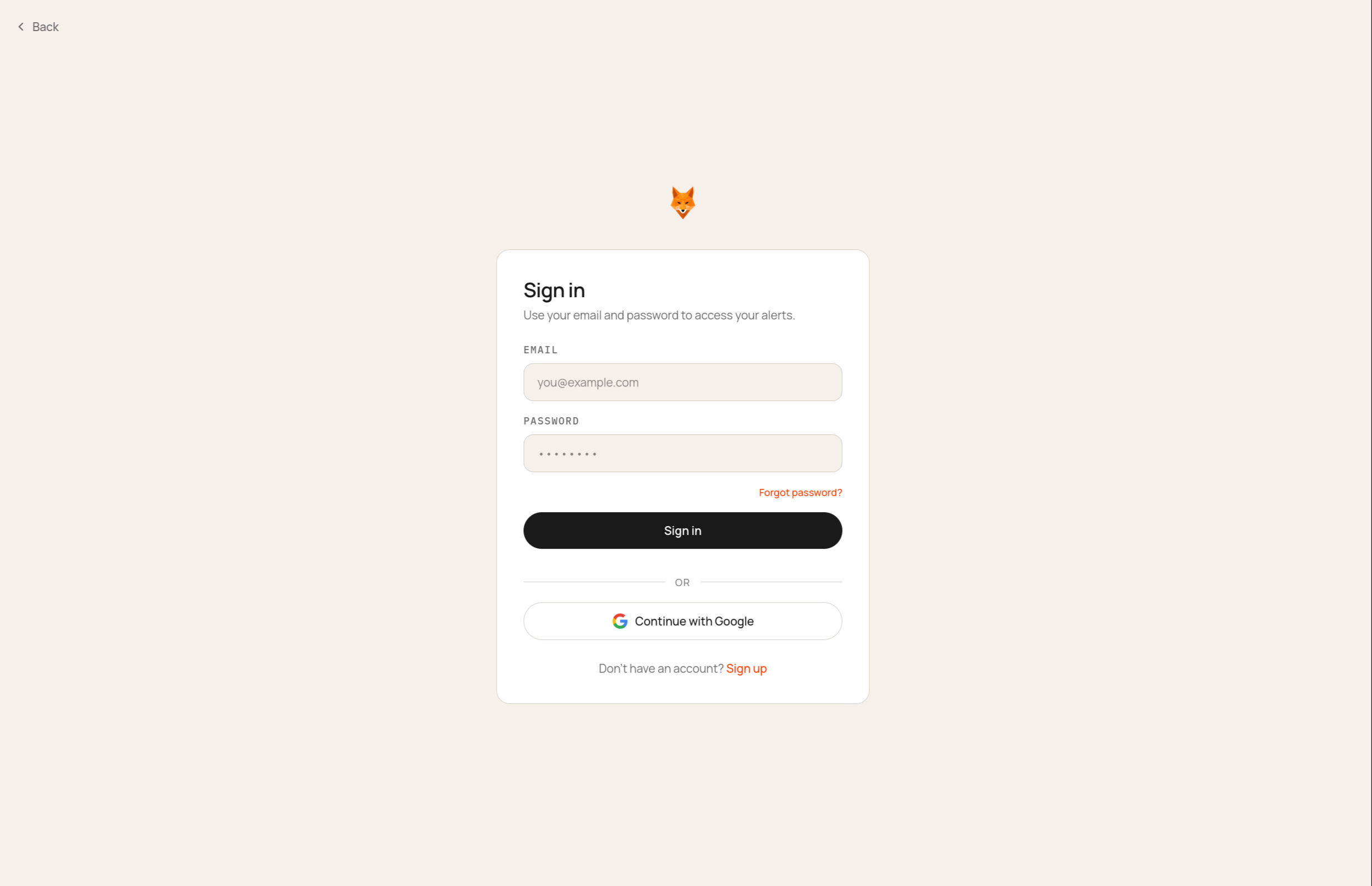 She answers three questions: what space she covers (Indian defense + dual-use),
her fund's thesis paragraph, and the funds she races to deals.
She answers three questions: what space she covers (Indian defense + dual-use),
her fund's thesis paragraph, and the funds she races to deals.
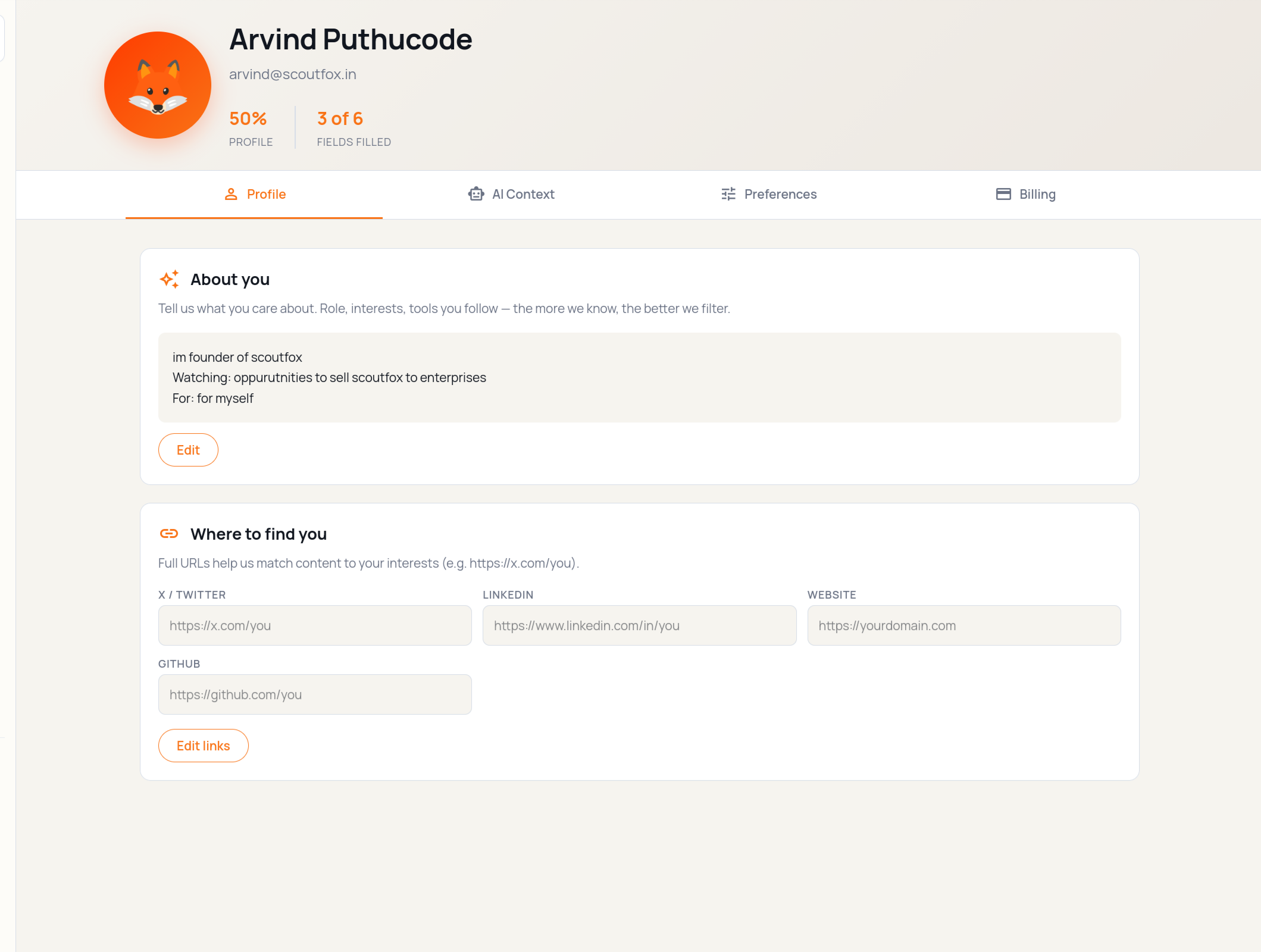 Next, ScoutFox asks how she wants to be reached. She picks Telegram and email;
WhatsApp stays off for now.
Next, ScoutFox asks how she wants to be reached. She picks Telegram and email;
WhatsApp stays off for now.
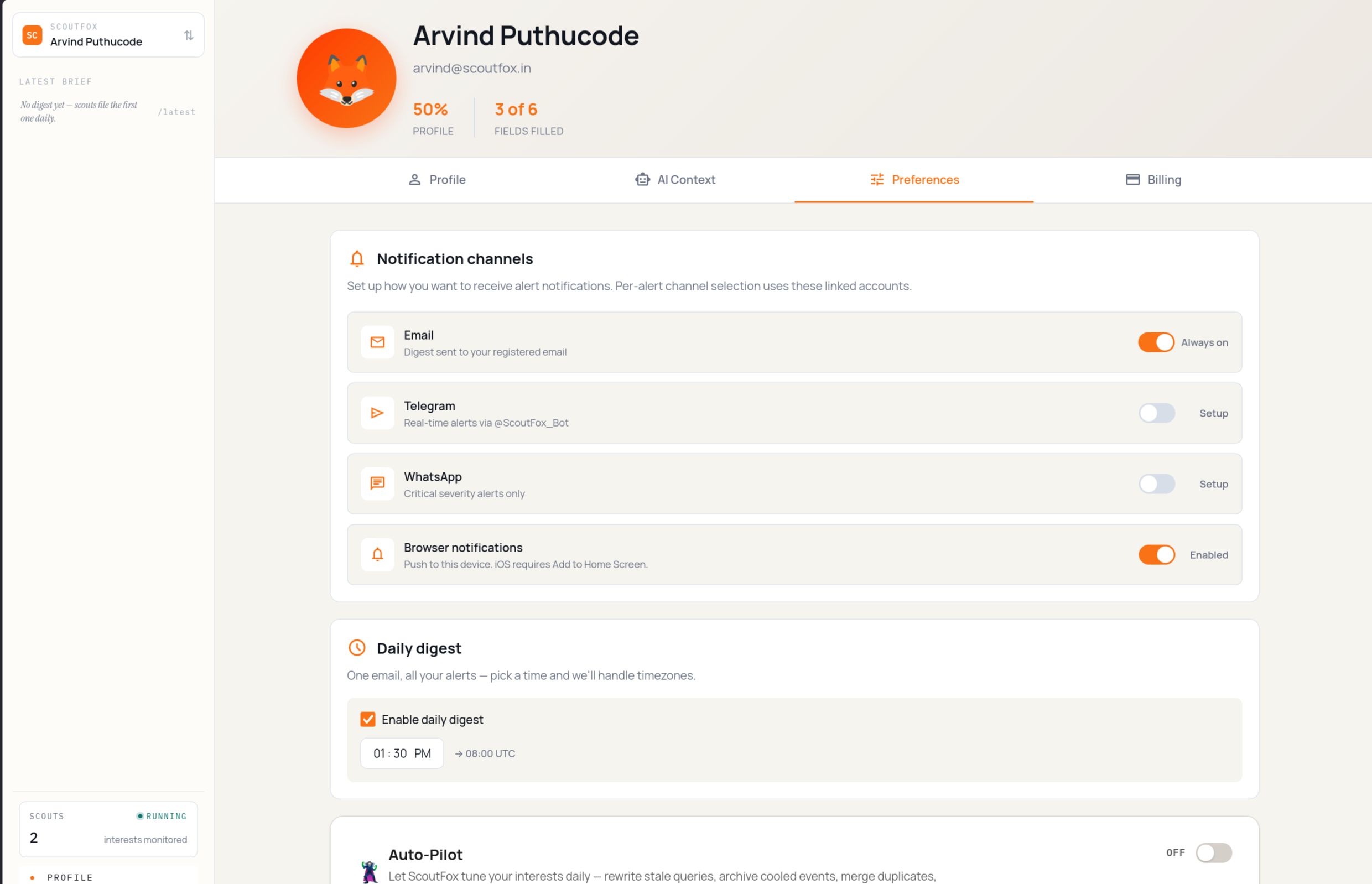 A quick recap of her brief and channels, and she lands in the app.
## 2. Interests list and first prompt [#2-interests-list-and-first-prompt]
Maya lands on her **Interests list** at `/dashboard`. The focus areas from
onboarding are already there as standing interests — none have run yet, so
the dispatch feed at `/dashboard/wire` is still empty.
A quick recap of her brief and channels, and she lands in the app.
## 2. Interests list and first prompt [#2-interests-list-and-first-prompt]
Maya lands on her **Interests list** at `/dashboard`. The focus areas from
onboarding are already there as standing interests — none have run yet, so
the dispatch feed at `/dashboard/wire` is still empty.
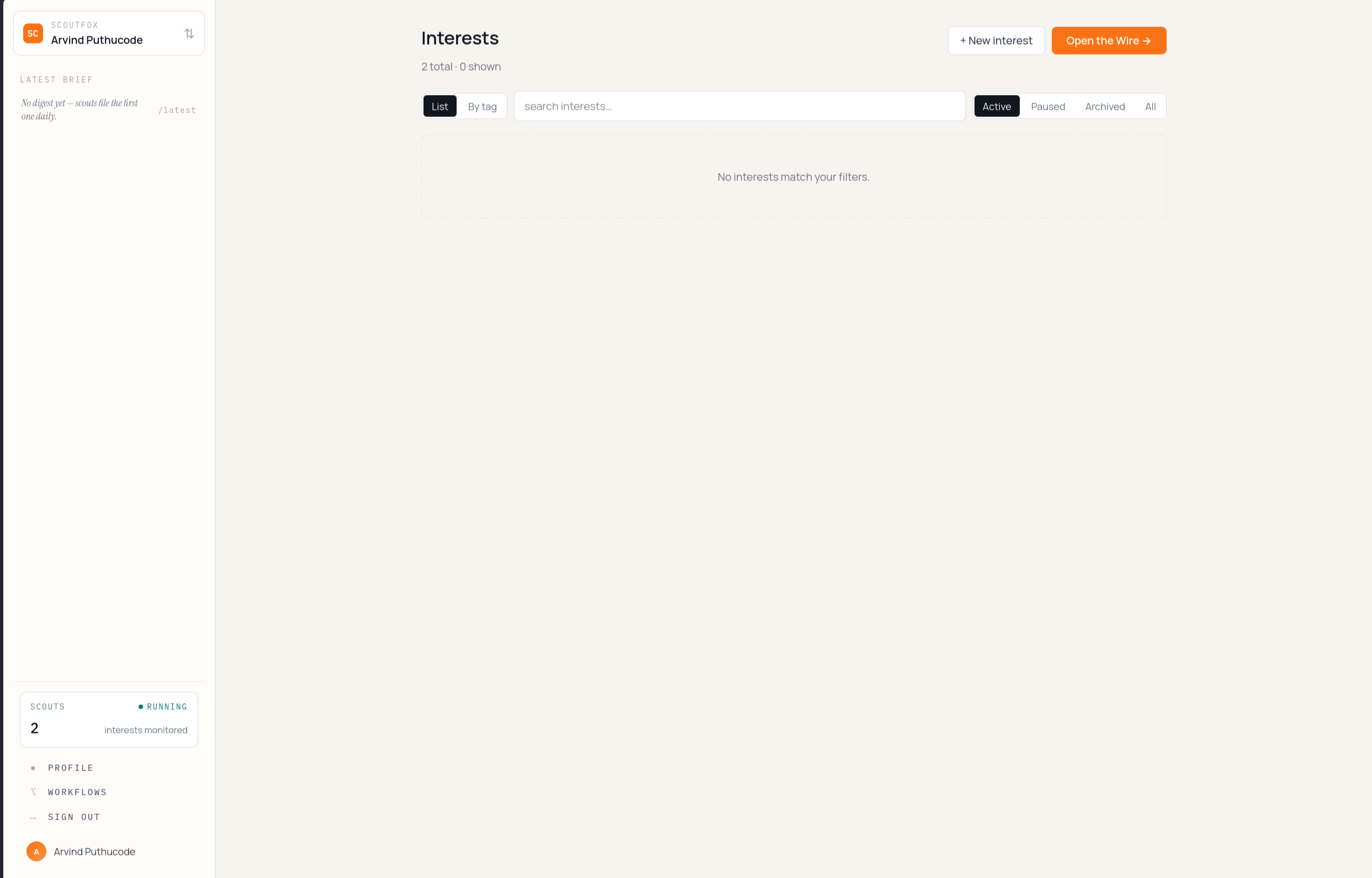 She opens cmd+k and types her own: *"early-stage Indian drone startups raising
seed."*
She opens cmd+k and types her own: *"early-stage Indian drone startups raising
seed."*
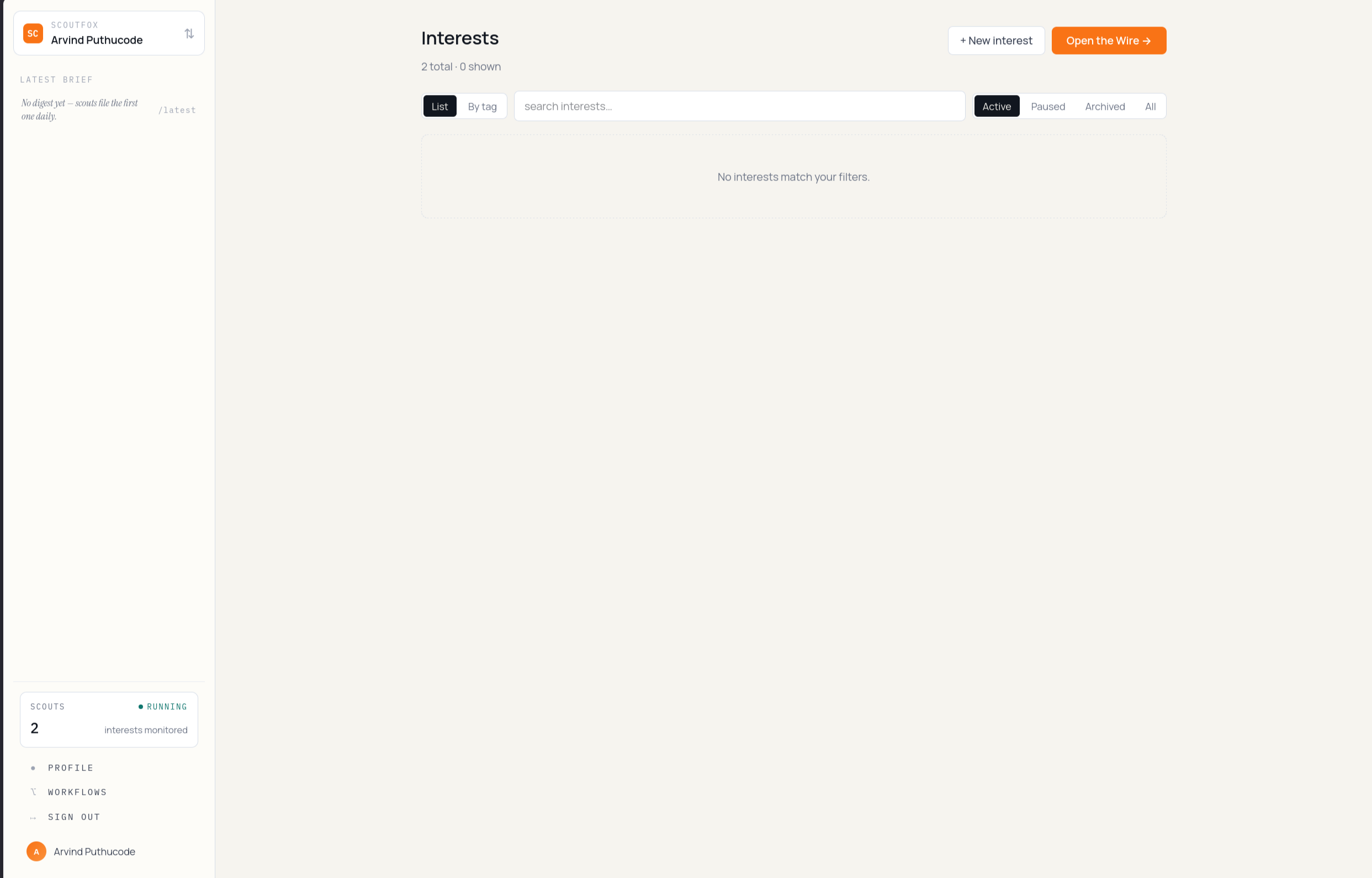 ScoutFox spins this into an **interest** under her brief, schedules it, and
sends her back to the Interests list — the new row sits at the top.
## 3. First Daily Brief arrives [#3-first-daily-brief-arrives]
A couple of hours later Scout sends the first Daily Brief. It contains three
things worth attention, with what changed, why it matters, sources, and one
next action. If Maya wants to scan the raw feed, the Wire has the same
dispatches.
ScoutFox spins this into an **interest** under her brief, schedules it, and
sends her back to the Interests list — the new row sits at the top.
## 3. First Daily Brief arrives [#3-first-daily-brief-arrives]
A couple of hours later Scout sends the first Daily Brief. It contains three
things worth attention, with what changed, why it matters, sources, and one
next action. If Maya wants to scan the raw feed, the Wire has the same
dispatches.
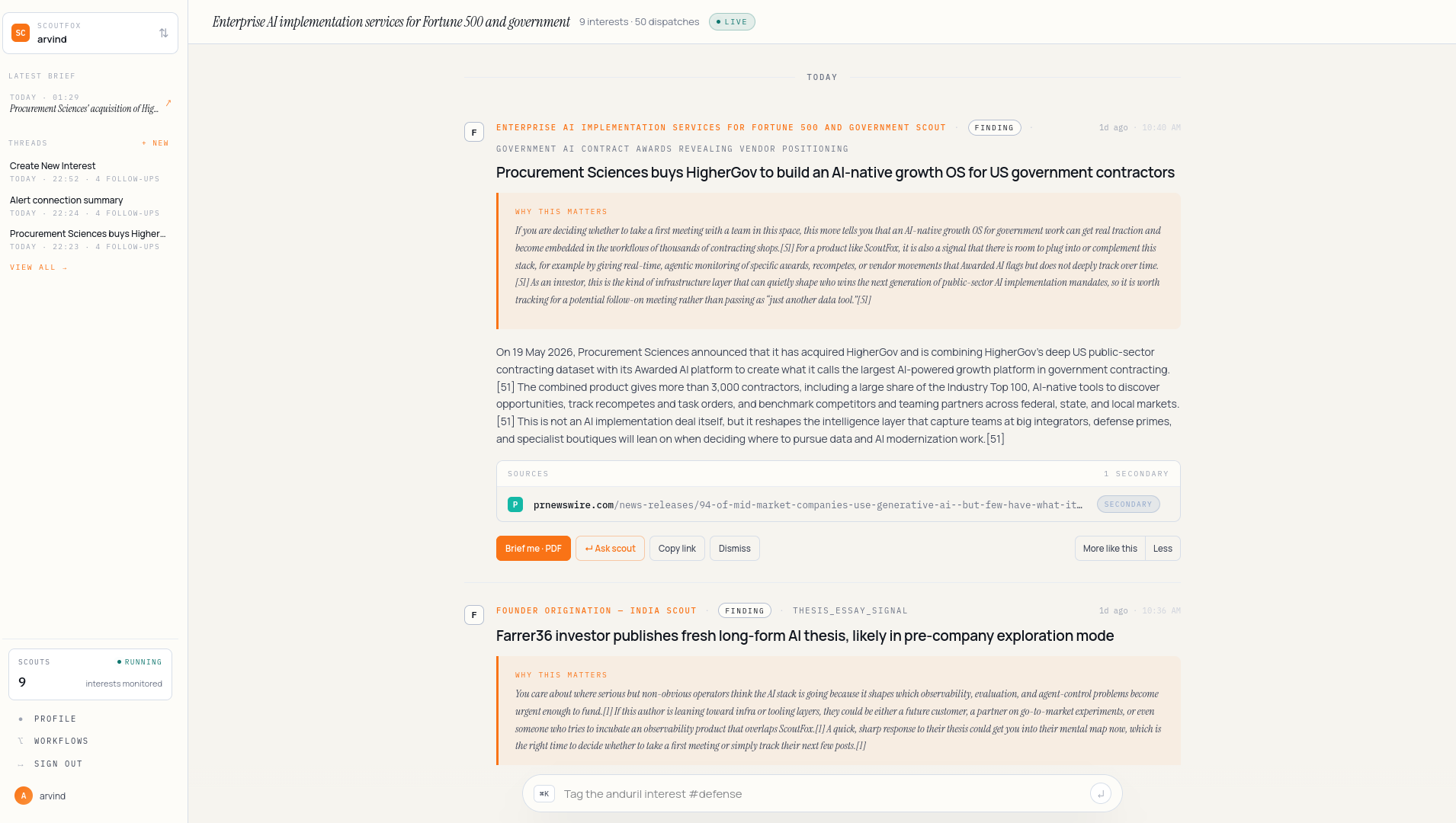 The card is dense. Top to bottom: a kicker (the interest), the headline (what
happened), why it matters to *her* brief, primary sources, and the actions —
**Brief me**, **Ask scout**, **Save**.
The card is dense. Top to bottom: a kicker (the interest), the headline (what
happened), why it matters to *her* brief, primary sources, and the actions —
**Brief me**, **Ask scout**, **Save**.
 ## 4. Brief me · PDF [#4-brief-me--pdf]
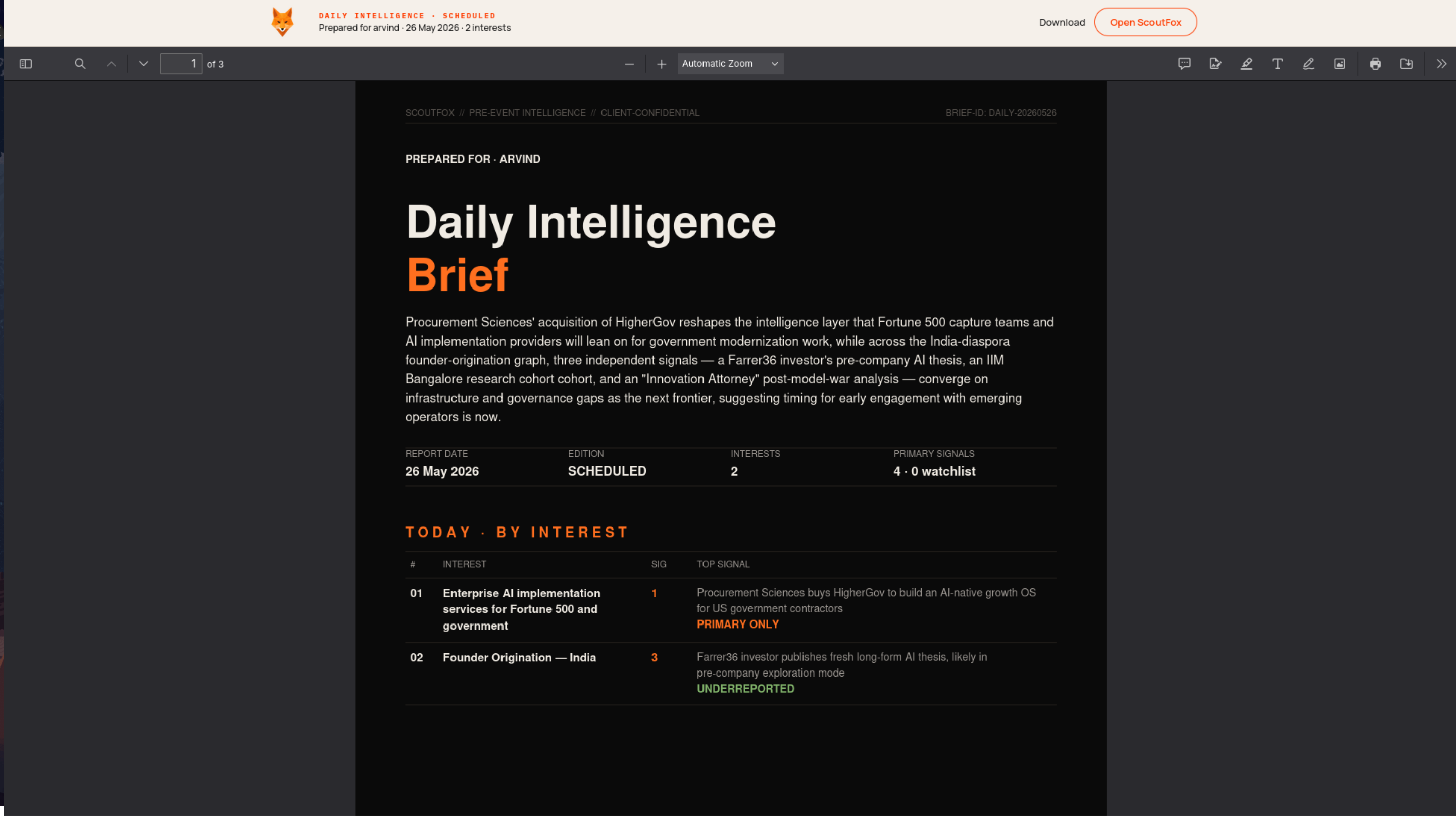
Maya clicks **Brief me**. A PDF opens in a new tab — one page, no fluff,
written for someone who already knows her thesis.
## 4. Brief me · PDF [#4-brief-me--pdf]
Maya clicks **Brief me**. A PDF opens in a new tab — one page, no fluff,
written for someone who already knows her thesis.
 ## 5. Ask scout [#5-ask-scout]
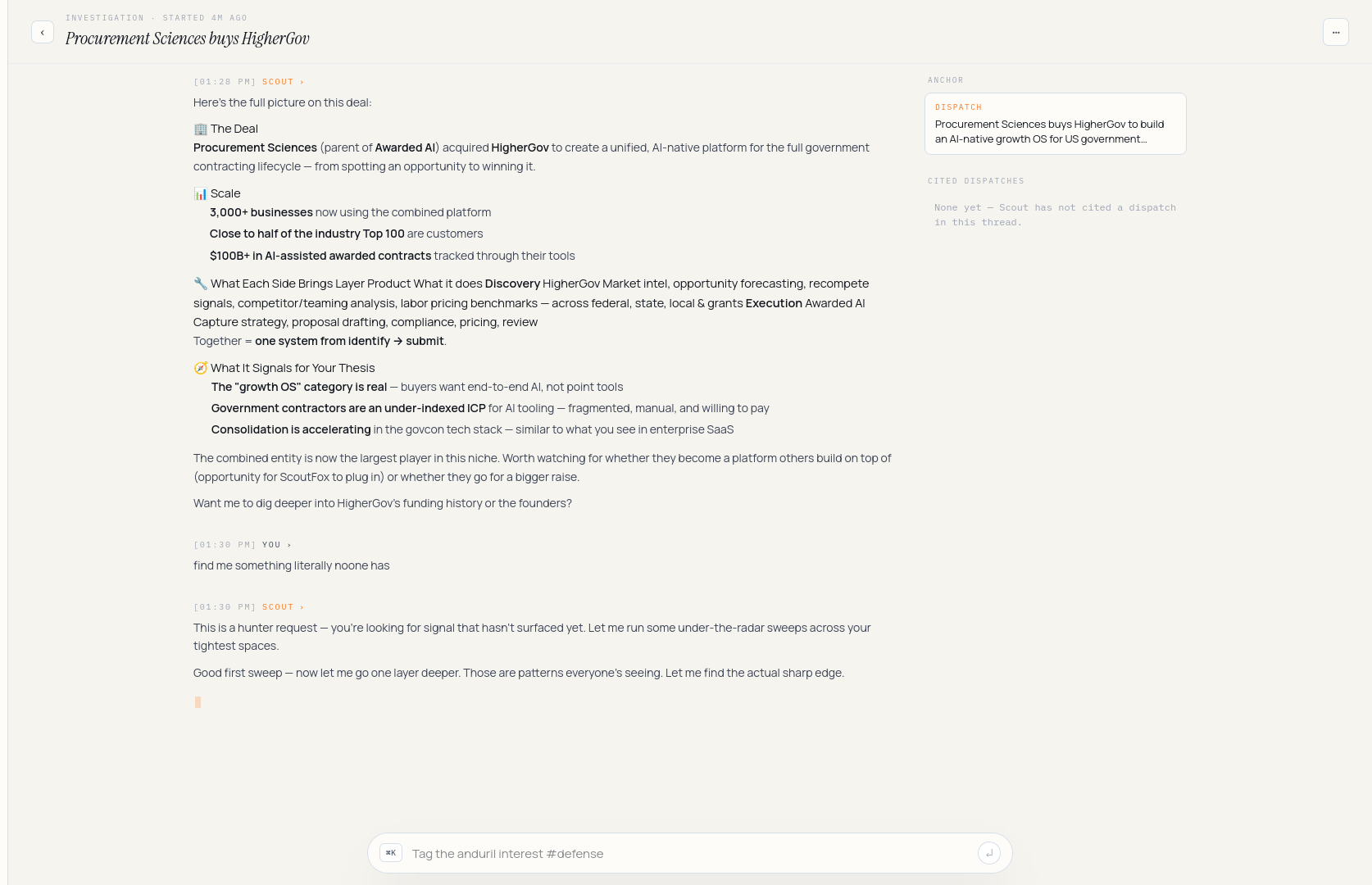
She wants to dig further. **Ask scout** opens a Scout thread, scoped to this
dispatch. If she had replied in WhatsApp with `dig deeper`, the long answer
would have landed in the same kind of app thread. She asks: *"who else has
the same founders touched before?"* The scout streams an answer with
citations.
## 5. Ask scout [#5-ask-scout]
She wants to dig further. **Ask scout** opens a Scout thread, scoped to this
dispatch. If she had replied in WhatsApp with `dig deeper`, the long answer
would have landed in the same kind of app thread. She asks: *"who else has
the same founders touched before?"* The scout streams an answer with
citations.
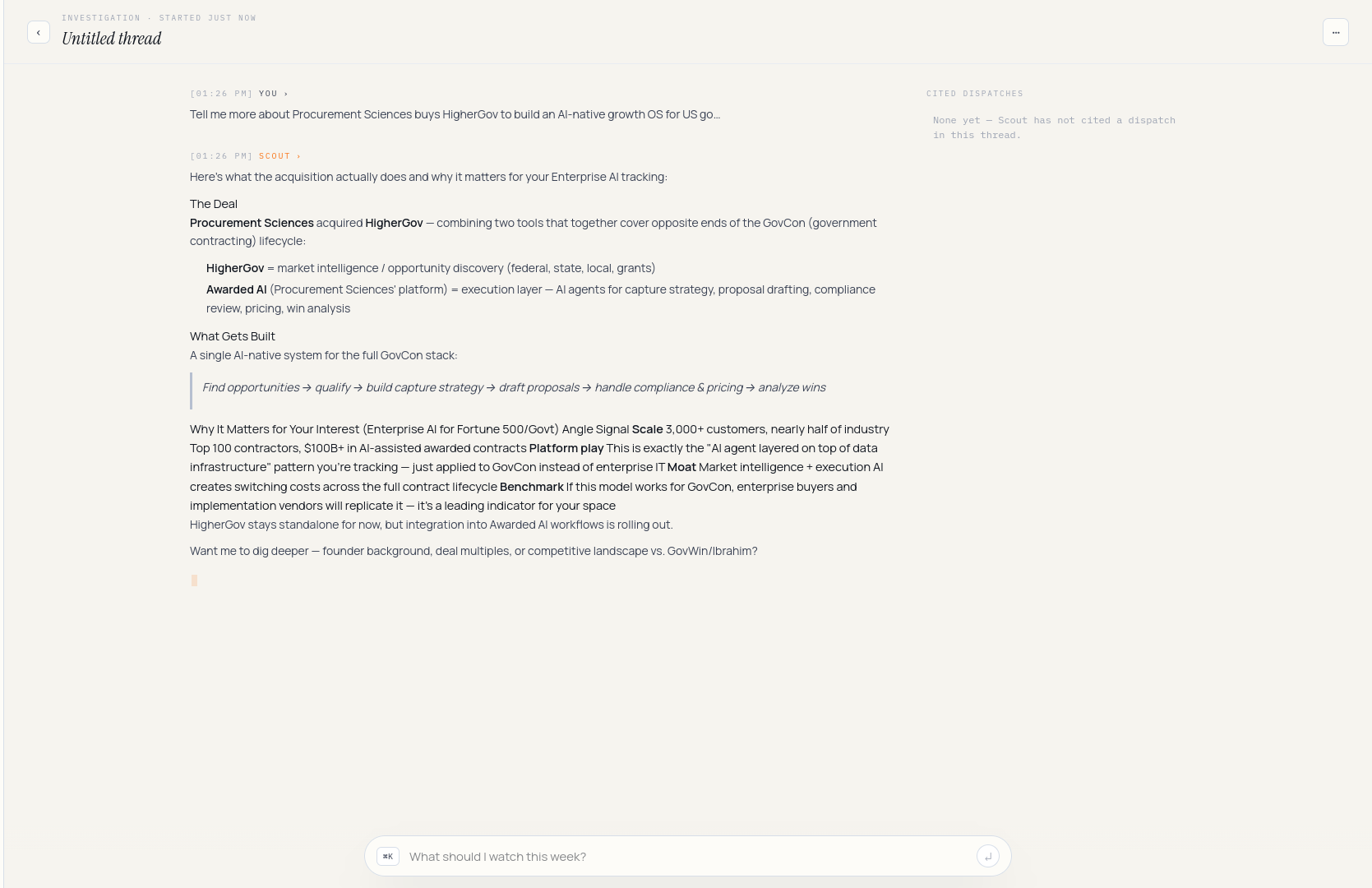 She follows up: *"any common investors across those?"* The thread continues.
 ## 6. Organize with tags [#6-organize-with-tags]
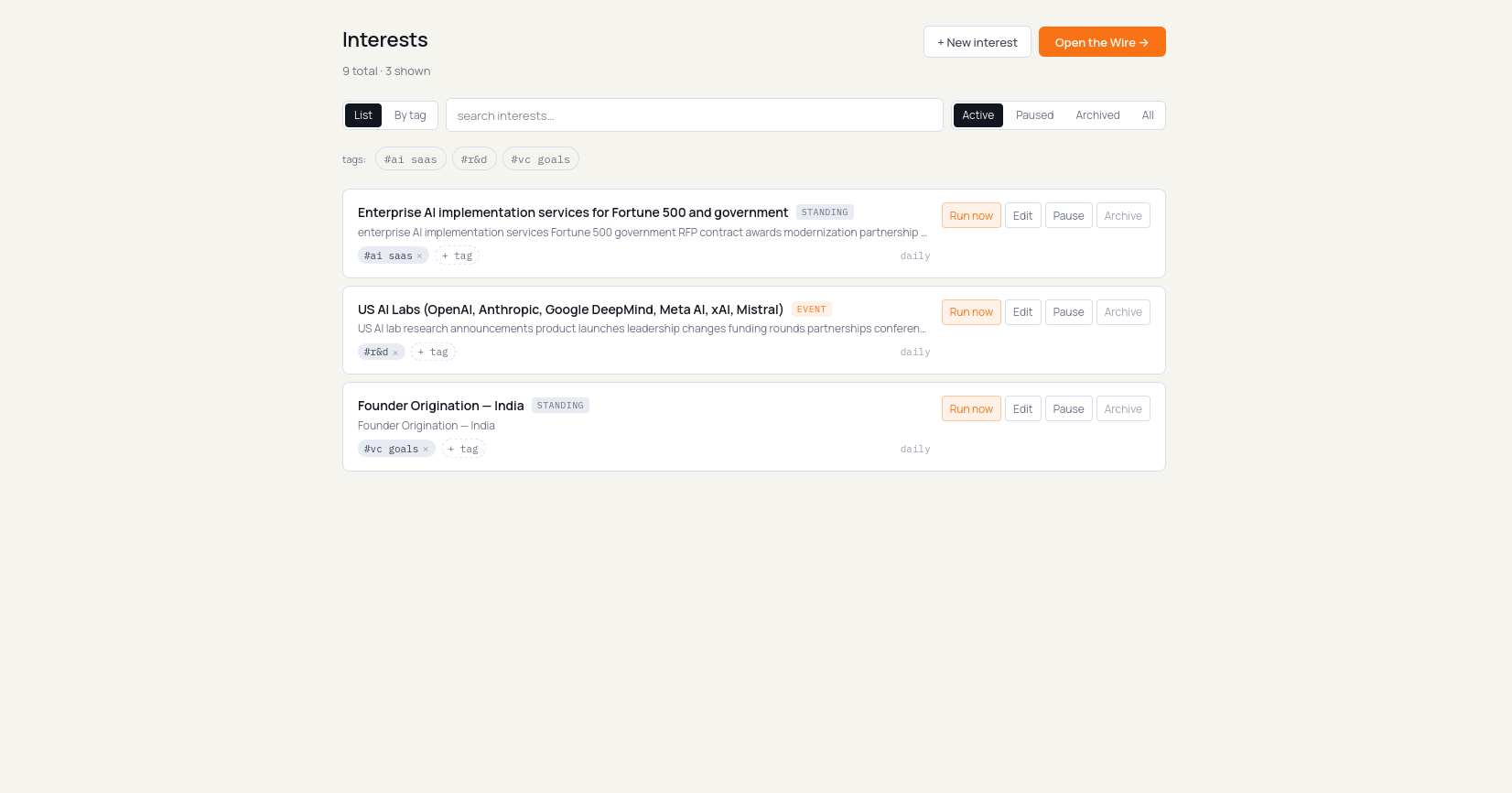
Maya wants to group the defense-flavoured interests together. She opens the
drone interest, clicks **Edit**, and on the **Basics** tab adds tags
`defense`, `india`. Save.
## 6. Organize with tags [#6-organize-with-tags]
Maya wants to group the defense-flavoured interests together. She opens the
drone interest, clicks **Edit**, and on the **Basics** tab adds tags
`defense`, `india`. Save.
 She could have done the same in one shot from cmd+k — `/tag defense india`
with the interest in focus — but she likes the visual confirmation.
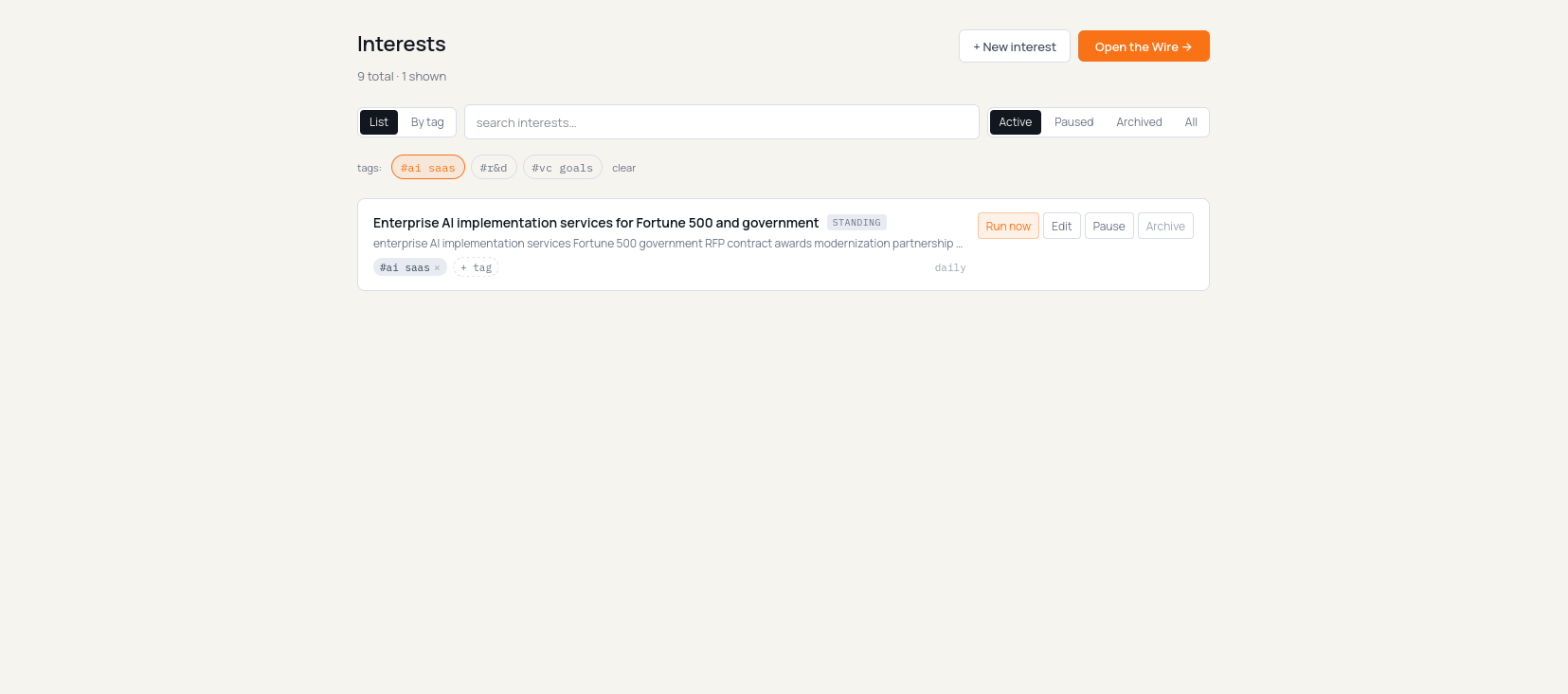
Back on the Interests list she flips the view toggle to **By tag**
(`/dashboard?view=by-tag`). The drone interest now appears under both
*defense* and *india*; uncovered interests fall into *Untagged* at the
bottom. Clicking a tag chip also filters the flat list down to that tag,
with a removable filter chip above the results.
She could have done the same in one shot from cmd+k — `/tag defense india`
with the interest in focus — but she likes the visual confirmation.
Back on the Interests list she flips the view toggle to **By tag**
(`/dashboard?view=by-tag`). The drone interest now appears under both
*defense* and *india*; uncovered interests fall into *Untagged* at the
bottom. Clicking a tag chip also filters the flat list down to that tag,
with a removable filter chip above the results.
 ## 7. Daily digest [#7-daily-digest]
Next morning Maya gets the Daily Brief again by email/WhatsApp and sees the
same edition in the app.
## 7. Daily digest [#7-daily-digest]
Next morning Maya gets the Daily Brief again by email/WhatsApp and sees the
same edition in the app.
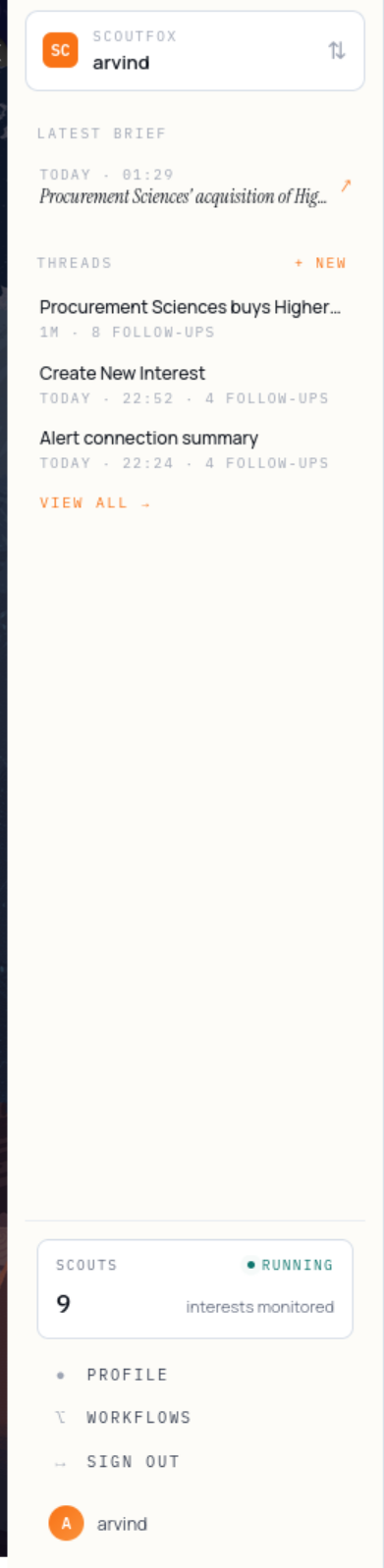 She opens it and the Daily Brief loads — last 24 hours of signals, grouped by
interest, with a one-line "what to do" under each. Reply verbs let her
explain, save, ignore, send, or dig deeper without hunting through a dashboard.
## What just happened [#what-just-happened]
Maya wrote a **brief** once. ScoutFox turned a prompt into an **interest**,
she labelled it with **tags**, the scout ran against it, filed **dispatches**,
sent a **Daily Brief**, let her continue in a **Scout thread**, and used
replies to sharpen future filtering. That's the loop: brief → interests →
Daily Brief → reply → memory. Every screen above is a step in that loop.
# Set up your newsroom (/docs/get-started/news)
Setup is three inputs about your beat. Everything ScoutFox surfaces is shaped
by them.
### 1. Name your beats [#1-name-your-beats]
The areas you cover — *markets*, *India tech*, *climate policy*, *crypto
infrastructure*, *enterprise AI*, whatever your desk owns. Beats are
free-form: name as many as you like.
Each beat becomes a live [interest](/docs/concepts/interests) — a standing
scout for one stream of stories.
### 2. Write your editorial angle [#2-write-your-editorial-angle]
A paragraph, in plain language. What you cover, what you don't, the angle and
voice that differentiate your desk from a wire service.
This text is the lens — every scoop-shaped dispatch is scored against it.
*"Markets + regulatory angle, India-first, no celebrity-CEO fluff"* produces
a very different Wire from a generic "markets" subscription.
### 3. Add the rival outlets you track [#3-add-the-rival-outlets-you-track]
The desks you don't want to be scooped by. ScoutFox checks every story
candidate against their public coverage. The
[scoop-shaped dispatch](/docs/concepts/dispatches#scoop-shaped-dispatches)
flags which rivals have covered it — and, more importantly, **which haven't.**
### 4. Read the Daily Brief [#4-read-the-daily-brief]
Your beats run on a schedule. Scoop-shaped dispatches arrive on the
[Daily Brief](/docs/concepts/delivery) ranked by editorial fit + how
under-covered they are. The [Wire](/docs/concepts/wire) remains available
when an editor wants to scan the live feed, but the brief is the default
morning output.
Reply `explain`, `save`, `ignore`, `send`, or `dig deeper`. Corrections like
"less rewrite coverage, more regulatory primary sources" update the watch
memory for future briefs.
The instant-push gate (when active) is intentionally strict: high confidence +
at least 2 rival outlets uncovered + primary source verified. Web-Intel fetch
flakes don't count as "uncovered" — the gate refuses to page an editor on bad
data.
## What you get [#what-you-get]
A focused Daily Brief of scoop-shaped signals — each one a single development
on your beats, with the primary source, who else has covered it (and who
hasn't), and an editorial angle. Read the
[scoop-shaped dispatch anatomy](/docs/concepts/dispatches#scoop-shaped-dispatches)
next.
# Overview (/docs/get-started/overview)
Setup is shaped around your **brief**, your **Interests list**, and the
channels where Scout should reach you. Six steps, most of them automatic.
### 1. Sign up [#1-sign-up]
Onboarding captures your [brief](/docs/concepts/briefs): a name, your focus
areas, a context paragraph (your thesis / editorial angle), competitors or
rivals you race, and how you want to be reached.
You don't configure individual alerts. The brief is the durable watch memory.
### 2. Land on the Interests list [#2-land-on-the-interests-list]
After onboarding you arrive on `/dashboard` — your **Interests list**. Each
focus area you named in onboarding has already become a standing
[interest](/docs/concepts/interests). Toggle between `List` and `By tag` from
the top of the page; click a tag chip to filter.
The [Wire](/docs/concepts/wire) — the live dispatch feed — sits one click
away at `/dashboard/wire`. It is secondary; the main loop is Scout reaching
you through a Daily Brief and letting you reply.
### 3. Create or refine an interest [#3-create-or-refine-an-interest]
Either accept the ones onboarding stamped out, or open `/dashboard/interests/new`
(or hit cmd+k and type `/new`) to create another. The form is tabbed: name,
query, tags up top; Signals / Investigation / Strategy underneath. Most
fields inherit sensible defaults from your brief.
### 4. Wait for the first Daily Brief [#4-wait-for-the-first-daily-brief]
Interests run on a schedule. Within the first digest cadence, Scout sends
the first [Daily Brief](/docs/concepts/delivery): three things worth your
attention, each with what changed, why it matters, sources, and a next action.
### 5. Reply or open a thread [#5-reply-or-open-a-thread]
Each Daily Brief item and dispatch supports the same reply grammar:
* **explain** — why this matters now.
* **save** — keep this signal close.
* **ignore** — suppress weak or irrelevant repeats.
* **send** — prepare a share/forward.
* **dig deeper** — continue in an app thread or email.
Long WhatsApp explanations hand off to an app thread so the chat stays
readable. Email replies normalize into the same conversation memory where
supported.
### 6. Manage with cmd+k [#6-manage-with-cmdk]
Anything you'd expect a "settings" tree to do can happen through the
Interests list, [cmd+k](/docs/concepts/cmd-k), and
[slash commands](/docs/concepts/slash-commands).
* `/pause anduril hiring`
* `/new early-stage indian drones`
* `/tag defense india`
* `/profile`
* `/quiet on 24h`
There is no separate templates page; cmd+k is the surface.
Edit your brief any time. Changes apply on the next run — there's no rebuild
step. A sharp brief produces a sharp Daily Brief; refine it as you go.
## Next [#next]
The VC quickstart — sectors, thesis, tracked funds.
The newsroom quickstart — beats, rival outlets.
The loop end-to-end.
# Set up your fund (/docs/get-started/vc)
Setup is three inputs about your fund. Everything ScoutFox surfaces is shaped
by them — so be specific.
### 1. Name your sectors [#1-name-your-sectors]
The focus areas you invest in — *clean-tech*, *robotics*, *fintech infra*,
*dev tools*, *consumer*, whatever your fund actually does. Sectors are
free-form: name as many as you like.
Each sector becomes a live [interest](/docs/concepts/interests) — a standing
scout that watches the web for early-stage signals in that area.
### 2. Write your investment thesis [#2-write-your-investment-thesis]
A paragraph, in plain language. Stage, sector, geography, what a fit looks
like, what you avoid.
This is the most important input: **every deal-shaped signal is scored
against this text.** A sharp thesis produces a sharp Daily Brief. See
[Thesis match](/docs/concepts/interests#thesis-match-vc-briefs).
### 3. Add the funds you race [#3-add-the-funds-you-race]
The competitor funds you'd most like to beat to a deal. When ScoutFox sees one
of them linked to a company, the dispatch flags it — *"also circling: a16z,
Speciale Invest."*
### 4. Read the Daily Brief [#4-read-the-daily-brief]
Your interests run on a schedule. As they surface signals, deal-shaped
items appear in the Daily Brief — ranked best-thesis-fit first, with sources
and the next action. The [Wire](/docs/concepts/wire) remains available when
you want to scan the live feed, but the brief is the main output.
Reply `explain`, `save`, `ignore`, `send`, or `dig deeper`. Deeper follow-up
continues in an app thread so the fund's watch memory improves.
Edit your thesis, sectors and tracked funds any time. Open cmd+k and type
`/brief`, or update via **Profile → Brief**. Changes apply on the next run.
## What you get [#what-you-get]
A focused Daily Brief of deal-shaped signals — each one an early-stage company
or founder movement matched to your thesis, with the founders, round status,
why now, and source links. Read the
[deal-shaped dispatch anatomy](/docs/concepts/dispatches#deal-shaped-dispatches)
next.
She opens it and the Daily Brief loads — last 24 hours of signals, grouped by
interest, with a one-line "what to do" under each. Reply verbs let her
explain, save, ignore, send, or dig deeper without hunting through a dashboard.
## What just happened [#what-just-happened]
Maya wrote a **brief** once. ScoutFox turned a prompt into an **interest**,
she labelled it with **tags**, the scout ran against it, filed **dispatches**,
sent a **Daily Brief**, let her continue in a **Scout thread**, and used
replies to sharpen future filtering. That's the loop: brief → interests →
Daily Brief → reply → memory. Every screen above is a step in that loop.
# Set up your newsroom (/docs/get-started/news)
Setup is three inputs about your beat. Everything ScoutFox surfaces is shaped
by them.
### 1. Name your beats [#1-name-your-beats]
The areas you cover — *markets*, *India tech*, *climate policy*, *crypto
infrastructure*, *enterprise AI*, whatever your desk owns. Beats are
free-form: name as many as you like.
Each beat becomes a live [interest](/docs/concepts/interests) — a standing
scout for one stream of stories.
### 2. Write your editorial angle [#2-write-your-editorial-angle]
A paragraph, in plain language. What you cover, what you don't, the angle and
voice that differentiate your desk from a wire service.
This text is the lens — every scoop-shaped dispatch is scored against it.
*"Markets + regulatory angle, India-first, no celebrity-CEO fluff"* produces
a very different Wire from a generic "markets" subscription.
### 3. Add the rival outlets you track [#3-add-the-rival-outlets-you-track]
The desks you don't want to be scooped by. ScoutFox checks every story
candidate against their public coverage. The
[scoop-shaped dispatch](/docs/concepts/dispatches#scoop-shaped-dispatches)
flags which rivals have covered it — and, more importantly, **which haven't.**
### 4. Read the Daily Brief [#4-read-the-daily-brief]
Your beats run on a schedule. Scoop-shaped dispatches arrive on the
[Daily Brief](/docs/concepts/delivery) ranked by editorial fit + how
under-covered they are. The [Wire](/docs/concepts/wire) remains available
when an editor wants to scan the live feed, but the brief is the default
morning output.
Reply `explain`, `save`, `ignore`, `send`, or `dig deeper`. Corrections like
"less rewrite coverage, more regulatory primary sources" update the watch
memory for future briefs.
The instant-push gate (when active) is intentionally strict: high confidence +
at least 2 rival outlets uncovered + primary source verified. Web-Intel fetch
flakes don't count as "uncovered" — the gate refuses to page an editor on bad
data.
## What you get [#what-you-get]
A focused Daily Brief of scoop-shaped signals — each one a single development
on your beats, with the primary source, who else has covered it (and who
hasn't), and an editorial angle. Read the
[scoop-shaped dispatch anatomy](/docs/concepts/dispatches#scoop-shaped-dispatches)
next.
# Overview (/docs/get-started/overview)
Setup is shaped around your **brief**, your **Interests list**, and the
channels where Scout should reach you. Six steps, most of them automatic.
### 1. Sign up [#1-sign-up]
Onboarding captures your [brief](/docs/concepts/briefs): a name, your focus
areas, a context paragraph (your thesis / editorial angle), competitors or
rivals you race, and how you want to be reached.
You don't configure individual alerts. The brief is the durable watch memory.
### 2. Land on the Interests list [#2-land-on-the-interests-list]
After onboarding you arrive on `/dashboard` — your **Interests list**. Each
focus area you named in onboarding has already become a standing
[interest](/docs/concepts/interests). Toggle between `List` and `By tag` from
the top of the page; click a tag chip to filter.
The [Wire](/docs/concepts/wire) — the live dispatch feed — sits one click
away at `/dashboard/wire`. It is secondary; the main loop is Scout reaching
you through a Daily Brief and letting you reply.
### 3. Create or refine an interest [#3-create-or-refine-an-interest]
Either accept the ones onboarding stamped out, or open `/dashboard/interests/new`
(or hit cmd+k and type `/new`) to create another. The form is tabbed: name,
query, tags up top; Signals / Investigation / Strategy underneath. Most
fields inherit sensible defaults from your brief.
### 4. Wait for the first Daily Brief [#4-wait-for-the-first-daily-brief]
Interests run on a schedule. Within the first digest cadence, Scout sends
the first [Daily Brief](/docs/concepts/delivery): three things worth your
attention, each with what changed, why it matters, sources, and a next action.
### 5. Reply or open a thread [#5-reply-or-open-a-thread]
Each Daily Brief item and dispatch supports the same reply grammar:
* **explain** — why this matters now.
* **save** — keep this signal close.
* **ignore** — suppress weak or irrelevant repeats.
* **send** — prepare a share/forward.
* **dig deeper** — continue in an app thread or email.
Long WhatsApp explanations hand off to an app thread so the chat stays
readable. Email replies normalize into the same conversation memory where
supported.
### 6. Manage with cmd+k [#6-manage-with-cmdk]
Anything you'd expect a "settings" tree to do can happen through the
Interests list, [cmd+k](/docs/concepts/cmd-k), and
[slash commands](/docs/concepts/slash-commands).
* `/pause anduril hiring`
* `/new early-stage indian drones`
* `/tag defense india`
* `/profile`
* `/quiet on 24h`
There is no separate templates page; cmd+k is the surface.
Edit your brief any time. Changes apply on the next run — there's no rebuild
step. A sharp brief produces a sharp Daily Brief; refine it as you go.
## Next [#next]
The VC quickstart — sectors, thesis, tracked funds.
The newsroom quickstart — beats, rival outlets.
The loop end-to-end.
# Set up your fund (/docs/get-started/vc)
Setup is three inputs about your fund. Everything ScoutFox surfaces is shaped
by them — so be specific.
### 1. Name your sectors [#1-name-your-sectors]
The focus areas you invest in — *clean-tech*, *robotics*, *fintech infra*,
*dev tools*, *consumer*, whatever your fund actually does. Sectors are
free-form: name as many as you like.
Each sector becomes a live [interest](/docs/concepts/interests) — a standing
scout that watches the web for early-stage signals in that area.
### 2. Write your investment thesis [#2-write-your-investment-thesis]
A paragraph, in plain language. Stage, sector, geography, what a fit looks
like, what you avoid.
This is the most important input: **every deal-shaped signal is scored
against this text.** A sharp thesis produces a sharp Daily Brief. See
[Thesis match](/docs/concepts/interests#thesis-match-vc-briefs).
### 3. Add the funds you race [#3-add-the-funds-you-race]
The competitor funds you'd most like to beat to a deal. When ScoutFox sees one
of them linked to a company, the dispatch flags it — *"also circling: a16z,
Speciale Invest."*
### 4. Read the Daily Brief [#4-read-the-daily-brief]
Your interests run on a schedule. As they surface signals, deal-shaped
items appear in the Daily Brief — ranked best-thesis-fit first, with sources
and the next action. The [Wire](/docs/concepts/wire) remains available when
you want to scan the live feed, but the brief is the main output.
Reply `explain`, `save`, `ignore`, `send`, or `dig deeper`. Deeper follow-up
continues in an app thread so the fund's watch memory improves.
Edit your thesis, sectors and tracked funds any time. Open cmd+k and type
`/brief`, or update via **Profile → Brief**. Changes apply on the next run.
## What you get [#what-you-get]
A focused Daily Brief of deal-shaped signals — each one an early-stage company
or founder movement matched to your thesis, with the founders, round status,
why now, and source links. Read the
[deal-shaped dispatch anatomy](/docs/concepts/dispatches#deal-shaped-dispatches)
next.